English visual novel downloads

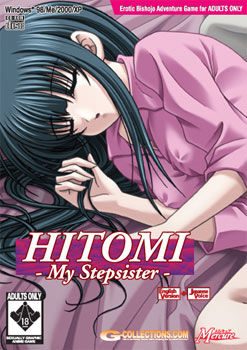
Hitomi - My Stepsister

Hitomi - My Stepsister

Things were going just fine until my father suddenly announced he was getting re-married, and his new wife and daughter were going to live with us. What am I supposed to do now?

My new step-mother is beautiful, but my new step-sister, Hitomi, is fascinating. She is so fragile and gentle. The way she smiles at me and tries to please me….I think she wants me. I….I think I want her. Whenever she is around me, I just want to possess her.

How far can I push her? What will she allow me to do to her?

“Please, Brother, I’ll do anything for you. Just please don’t hate me…..”
352 comments

AlexanderReply
I keep getting "Error in command line" when trying to mount the second disk, help please.
AlexanderReply
ignore my last comment. I only have a problem with the program going "not responding" after about 5 to 10 minutes of play. I am temporarily countering it with saving often, but I need a permanent solution. Help me please.
JingReply
Hrm, tried reinstalling it? Install a codec program, like K-Lite Codec Pack Maybe that help. Either that copy the files to your installation folder? hope that help.
Kirai AizurenReply
i get the same problem with the sound looping for 10sec. and eventually the program is not responding if i try to access the main page or play it over 10 min. after the looping started. the solution i’ve done is change the program compatibility to Windows XP (Service Pack 3), and the bug is gone. i don’t know if Windows XP (Service Pack 2) will work as well, happy experimenting. :D

#Aizuren Signing Out…
MimiReply
Please, can someone help me with installing , i have download daemon tools and all 3 parts of rar but am unsure of what to do next . i am new to downloading eroge, if anyone could help me would be appreciated ~
RyoichiReply
1. Install daemon tool ( i think you don't need to use this software, theres no image to mount, if i am not mistaken.)

2. Extract part 1 (you don't have to extract part 2 and 3, it will automatically extract it when you extract part 1.)

3. Make sure the crack file is in the same file as the game.(copy and paste on the game file and overwrite the .exe .)

4. Run the game using the .exe file.

5. Enjoy. :)
RyoichiReply
Oh just in case there is an image file when you extract part 1
mount the image file using daemon tool and install the game first then copy the contain in crack file to game file, not straight on disc image.
SnoopReply
Man... Can somebody help me? i can't do well with the Daemon Tool, sorta of. Every time I want to Mount Image on the Virtual Device It's kinda not mounting.
And because of that my reasonable reward is.. "Please insert the game disk and click OK..
T^T
RyoichiReply
are you sure you mount a correct file.?
if you are not sure then, select all file at files of type option then try to mount the correct file.
SnoopReply
OH... I did it.. Thx Ryoichi.
But now I have a new problem
"Failure to acquire necessary data from Server
Error Code 0x00030001"
How can I pass this problem?
RyoichiReply
Have you already install the game?
Do you have that error when opening the HITOMIML.EXE or any file from VMfolder? Because if it from VMfolder, there is nothing to worry because you don't need to install VM to play the game. If you have that error when opening HITOMIML.EXE, copy HITOMIML.EXE from crack folder than paste into the game folder and overwrite the current one.
SnoopReply
Wow. Thanks alot.
I can play this game now
c-xReply
wow, this is great. Is there any game like this?
monozuReply
can someone help me?when i installing the game till 99% it call me to "Please insert the "Game Disc" and click ok"..
c-xReply
- unmount cd 1
- mount cd2
- click ok
anonymousReply
does work for me
GenjiChanReply
Why the heck does this "virtual " thing connects to the internet?!
adminReply
It's old "activation" DRM system, that was used by JAST until like two years ago. If you use cracked exe, nothing will try to connect to internet.
GenjiChanReply
Thank God I manage to get this over with (Right after a couple of deletions, dismounting and mounting)

At first glance in the intro of the game, lets me think of this as a suspense aka murder game...
NanoReply
I download all 3 parts and put them all into a folder. I have also changed the locale to Jap. When I open part one there's 5 files 2 MDF, 2 MDS, and a crack folder. I clicked on the largest file but can't open it. When i click the file in crack Hitomiml.exe it say can't use the "connected fild GGD." It seems like I can't even install the game yet. Please help.
RyoichiReply
1. Install daemon tool

2. Extract part 1 (you don’t have to extract part 2 and 3, it will automatically extract it when you extract part 1.)

3. Mount cd 1 using daemon tool, then install game. When the installation ask you to insert disc 2, unmount disc 1 and mount disc 2.

4. After installation is finish, copy HITOMIML.EXE from crack folder to game file. Make sure the crack file is in the same file as the game.(copy and paste on the game file and overwrite the HITOMIML.EXE .)

5. Run the game using the HITOMIML.EXE file.

6. Enjoy playing the game. :D
TOSHIINAReply
i did what u said but it doesnt work windows error "failure to acquire necessary data from server " error code 0x00030001
plz help me T.T
AnonReply
Does anyone have a step by step to this installation its the comments are everywhere. Trying to install this game but it has errors. Thanks.
HELPPLSReply
When i try to install it, it comes up with "Please insert the "Game Disc" and click OK. I followed all the steps...whats wrong?
RyoichiReply
unmount disc 1 then mount disc 2.
that should solve the problem.
Dragan NeoReply
can somebody help me please ??? I have installed SETUP.exe, but when the progress is at 99 %, it says "Please insert the Install Disc and press Ok". I can`t understand this T.T
Kirai AizurenReply
just mount the second disc
kyuubiReply
Erm.. For some reason whenever i play this game and reach any endings(after finish the credits and stuff) my game would stop responding and also sometime when i am playing the story halfway my game would also suddenly stop responding. Any idea how i can stop this from happening?
SneakyReply
Same problem as kyuubi but I've gotten one ending. Another problem is the music cues will loop the first 10 seconds over and over again whenever one cue is completed and is suppose to start over, it continues even if close the game. I have to go into Task Manager to stop it. Also, why is this game using between 50%-100% of my CPU power?
kyuubiReply
No idea why, mine only stop responding whenever i reach a ending and sometimes the game stop responding when the music starts to loop.
Kirai AizurenReply
i get the same problem with the sound looping for 10sec. and eventually the program is not responding if i try to access the main page or play it over 10 min. after the looping started. the solution i’ve done is change the program compatibility to Windows XP (Service Pack 3), and the bug is gone, btw, the OS i used is Windows 7 Professional . i don’t know if Windows XP (Service Pack 2) will work as well, try experimenting.

#Aizuren Signing Out…
SneakyReply
I think fix'd my problems. I mounted the disk and then ran the game off the setup file in there. I lost all my saves but was able to catch up to where I was by using "skip all" in the options menu.
kyuubiReply
erm did u mean u play the game with having the file mounted or do u mean u install the game again with the setup in the mounted file?
SneakyReply
Here's what I did:
1. I mounted a disk (Doesn't matter which one.)
2. Went to Computer in the Start menu.
3. Right-Clicked the "Hitomi – My Stepsister" icon and click open
4. Look for the "SETUP" file there and double-click it.
5. A warning window may come up, click "Yes"
6. A window with 2 of the game's main characters should pop-up with 5 buttons in the lower-right hand corner that say Play, Reinstall, Uninstall, Help and Quit.
7. Click Play to play the game.
SneakyReply
Note: I have to do this every time to play the game without it crashing on me and to stop music cues from looping for 10 seconds. I recommend keeping the disc mounted and making a shortcut to the “SETUP” file there.
kyuubiReply
I see i will go and try it now thanks =D
Kirai AizurenReply
i get the same problem with the sound looping for 10sec. and eventually the program is not responding if i try to access the main page or play it over 10 min. after the looping started. the solution i've done is change the program compatibility to Windows XP (Service Pack 3), and the bug is gone. i don't know if Windows XP (Service Pack 2) will work as well, try experimenting. :D

#Aizuren Signing Out...
Outpost Omega JReply
*WARNING: SPOILERS*
Skip past this if you haven't played!
*WARNING: SPOILERS*
And just in case you haven't got it yet:
*WARNING: SPOILERS*

Is there a route with Hitomi where the MC does NOT rape her, or at least turns from rape in to a real relationship?

(This line is a space filler so the next person to leave a post can make sure this message is off the screen while they type, or so I hope.)
(Another space filler.)
(Third space filler.)
(Yet ANOTHER space filler.)
SneakyReply
No Rape:negative, Turing it into a relationship:Yes. But only when you reach the climax of being a bastard to her.
Eroge MasterReply
Spolier
=
=
=
=
=
=
Actually if you dont take her underwear you get to have sex with yoko then have sex with hitomi and yoko together which was pretty awesome
AaronReply
When I click play I get this: “Failure to acquire necessary data from Server
Error Code 0×00030001″

What should I do?
Kami-samaReply
i'm having the same problem. anyone know what to do?
IchigoReply
It appears that I've installed it, by mounting each cd and it comes up with the window saying Play, Reinstall, Uninstall, Help, Quit.. But when I click play, nothing happens. Any idea what I've done wrong? haha :(
AaronReply
You need to replace the hitomiml file from the Mercure folder(which is probably located in your program folder) with the hitomiml file in from the crack folder.
HoshiReply
Failure to aquire necessary data from Server Error Code 0x00030001
is it because i have a x64 windows
HoshiReply
Fixed it.
anonymousReply
ok, I figured out why it wouldnt work. you have to remount the 2nd disk to the same drive as the 1st, I just deleted the whole drive
ElliotReply
im on the GGD problem, my crack file is in the same file as my game, it keep telling me the same, should i redownload it?
JoshuaReply
I have the same problem too. They said earlier in the comments that when it says GGD, your cracked app has to be around the other files (im assuming theyre the mdf/mds). I put the app in the same file, and it still says the same thing. Admin help please!
biggyReply
I was really enjoying this... up until I randomly raped my cute sister then kept doing it again and again regardless of how nice I was trying to be.

Leave a comment