English visual novel downloads

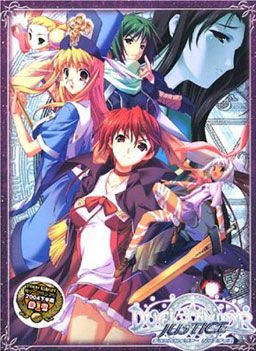
Duel Savior

Duel Savior

There is a prophecy that every 1000 years, when the destruction draws near, the Messiah will come from a different world to the root world of Avatar and save them all.

Mia Touma, while returning home from school, finds an old but highly decorated book. When she shows it to her brother, Taiga, the book teleports them to another world - Avatar.

When they awaken, they find themselves in a world reminiscent of Medieval Europe. Before they understand what’s happening, an energetic woman comes before them and tells them they have become Savior Candidates.

They must use the training they learn at the school to defeat the Lords of Ruin and Ruin itself to save Avatar and every other world along with their friends. However, Taiga finds he has become the Red Apostle, which complicates matters greatly. What is going on with the fight with Ruin? Will he actually be able to become the Messiah and save Avatar?
582 comments

Leo80221Reply
I can't seem to get the patch to work for me -_- help please!
DraculReply
to get the patch to work leo do this coppy and past the files and do not deleat the main game file to do so you'll need to uninstall it then reinstall it just patch then open the game folder to click on dule savior english then play it in destiny or justice your choice.
-M-Reply
This game runs good in Windows XP. The only issue at this point is the game automatically exit when Taiga Touma feels sleepy in the principal's office. When I checked the locale, it's in English, so I changed back to Japanese. Now it doesn't have that problem anymore (also the font a little bit screwed up in English Locale). I played it until the two protagonist goes to the dorms for the first time and have no problem at all up to this point (and I hope no at all until I finished it) :)
ChewyDevilReply
Is their any way of getting the game into windows mode instead of full screen? My moniter is really buggy when it comes to full screen games for some reason. >-<
-M-Reply
From previous comments, someone said to you can change into window mode from Control Panel and somehow change to 16 bit color.
JimmyMcSandersReply
Can someone tell me how to get on Crea's route? I can't find it in any other walkthroughs.
-M-Reply
In order to get Crea's route, you need to choose Destiny (not Justice) in the beginning. Next, you must finished Berio/Kaede route first, then the other one between Berio/Kaede you didn't choose earlier, then Rico/Nanashi, then the other one between Rico/Nanashi you didn't choose earlier, then Lily, and the last Mia's route, and you'll get her route.
KittygoopReply
I have been playing with this game for a while, trying to get it to run on my Windows 8 machine. I finally found a work around using a virtual machine. (VirtualBox) Technically not really running on Windows 8, but it still allowed me to play. VirtualBox with XP installed. Then just install the game as you normally would and it should work. Hopefully this helps some people. I'm not all that tech savy myself, just stubborn with time on my hands.
jbl123Reply
Best game played in a very long time, thanks a lot ADMIN!
JonathanReply
Hoping to be pointed toward eroge type games with some action play.
Super_SoulReply
Could someone help me with the installation? I have install it on my Windows 8. while I want to extract the english patch directly to the game directory, it says error and so on. If I extract it in different place and insert it into the game directory, the game have some unknown Languange and there's only Okay button and the application don't wanna function. please help me!
iceReply
can someone tell me where i went wrong?
i just finish installing the game and open the application then after a few seconds a message pops out saying
"duel savior has stopped working" i dont know what to do anymore :(

im using windows 7 ultimate 64bit. it would be nice if some give me an advice about this :)
kroznakReply
Can I get a tip on the install?
I installed the game, and then the english patch, but when i try to run the program I get a "Duel Savior is not responding" error.

Running on win7

Any help would be appreciated.
Super_SoulReply
Hey Kroznak, maybe you're have the same problem with me. Try to change the Locale to Japanese also extract the patch on other place. After you extract it, place it on the game directory. I have do that and succeeded
izanagi11Reply
hey guys. i have windows 7 laptop and i downloaded the english version, but when i launch the game, all i get is a black screen with a window i can't even press "OK" or "Cancel" on, with message that's in japanese. from what it looks like, it wants me to "insert disc 2".

any ideas on how to fix this?
TylerReply
So I got the game to work but my english translation isn't working. Do I have to uninstall and reinstall?
TylerReply
The problem was that my antivirus software was reading the application I needed as a threat so it removed it. The correct file is Duel Savior.exe of anyone else was having the problem. Make sure your antivirus protection doesn't remove it otherwise it won't work right when you overwrite the files.
JackReply
Can someone make a Save Open program that leads to the game's saves?
JackReply
Is there a program that leads to the game's saves? There are not in the game directory.
CrowReply
I'm getting a \duelsavior.exe has stopped working\ error when I played the Chapter 7... Can someone help me how to fix this?
ventReply
hi i need help each time i try to play the game it keeps saying direct draw.? i dont know what to do i use windows 8 btw
KawaReply
What do you do when you get a disc burner something to operate the game? D:
I-Am-XReply
Game kept crashing whenever I'd go and talk to the ninja kaede after fighting her. Can't find a way around that.
=(
HadiReply
somebody please help me !!
i got problem, soon after taiga had sex (or not) whit berio at crunch this game stop working !!
i use laptop whit windows 7 as OS so please help me !!
SomeoneReply
When I run the Duel Savior file (i patched itt by crea quick fix) the screen went black and a board appeared. It said some thing that i couldn't understand but i saw Game Disconnected. Need help!
SomeoneReply
Admin, there is 13 files in the free download english patch right? Or is it just a bug?
Ex NihiloReply
non blood related sister...ok. My life will be much safe now...
darthjamesyReply
Whenever I open the DuelSavior.exe (without the+patch) nothing seems to happen, and when I open it with the patch a notification saying something about DirectDraw with some Japanese (‘Direct Draw failed to initialize, kill the program’ was what came out of google translate) came up with a Black window of Duel Savior. Playing the game on Windows 10 and on Japanese Locale but I don’t know what’s wrong….

Help Please Admin >.<
darthjamesyReply
Don't worry admin - I found a website which told me my problem....according to it it's pretty much impossible to play Duel Savior unless I have windows 7, which isn't possible (not going to the extent to use a virtual computer - seems way too confusing). Here's the website I found for anyone else with this persistent problem: http://answers.microsoft.com/en-us/windows/forum/windows_8-gaming/directdraw-was-deprecated-in-windows-8-but-i-need/d21d6775-1006-4da9-a642-39553b286a49?auth=1
TahnerdReply
Im too lazy to try, but one fix might be to run it in a virtual windows 7 on windows 10. Might fix the problem but I'm not too knowledgeable on how virtual pc stuff works.
charlbeefReply
hi, how many heroines does this vn have?
BladeReply
There is 6 heroines i believe, 7 routes
exodiaReply
So how does all this work? Do I download each individual .rar file and then extract only part 1 or do i extract all of them and place the contents into 1 file?
gunkboyReply
Just found this patch for windows 10 / 8 if people are having trouble with direct draw errors: http://www.mediafire.com/file/9x4z0uwx2bz2gd4/ds_wineddraw.7z
AnonReply
I fixed DuelSavior not starting up, having a white screen and a DirectDraw error, and finally crashing on startup, by doing the following after trial and error:

Do not delete anything from the game installation folder, or I can't guarantee this will have a chance of working for you.


I found a fix for the DirectDraw error that doesn't make you have to use a virtual machine interface that will make you have to download a new OS and make you have to switch between your OS and a different OS every time you want to use the game.

That fix can be downloaded from here:

http://www.mediafire.com/download/9x4z0uwx2bz2gd4/ds_wineddraw.7z

To fix the problem of the game freezing on a black screen and crashing on startup, I looked for a fix which I finally found.

I replaced the voice1.pac with a correct voice1.pac from here:

http://games.seiha.org/duel_savior_files/
It seems the one in Erogedownload's files is missing around 300 megabytes of data.


When you run the game use the DuelSaviorMod.exe instead of DuelSavior.exe which doesn't even start the game and instead of Duel Savior.exe which only gives a white screen with a DirectDraw error message.


_______________________________________________

Follow the Instructions below in order to run the game successfully:

1. On a fresh installation replace voice1.pac in the game folder with the voice1.pac you downloaded from here:

http://games.seiha.org/duel_savior_files/

2. Copy all the files from the English Patch WITHOUT overwriting the newly replaced voice1.pac.

3. Copy the 2 DLLs and DuelSaviorMod.exe from the DirectDraw Fix you downloaded here:

http://www.mediafire.com/download/9x4z0uwx2bz2gd4/ds_wineddraw.7z

4. Open the game using the DuelSaviorMod.exe

_________________________________________________________


Note that using the DirectDraw error fix will only lead to a Black Screen and the game crashing on startup, you MUST add the Black Screen Crash on Startup fix then without overwriting the Corrected voice1.pac add the other files from the English Patch folder, then add the DirectDraw error patch and use the DuelSaviorMod.exe to play the game.
MellinReply
Since one doesn't want to replace the voice1 file while copying the English patch wouldn't it be easier to just First replace the English files and Then change up the voice1 file?
MaxwellReply
Is this can be played in Win 10?
Hopefully I can finished this great VN, cause 5 years ago can't play in Win 8, but still can play in Win XP.
Since my data has gone, and only using my very old XP to play old games, I'm starting download again right now and hope I can continue the excitement like when I finished the first chapter :D
MaxwellReply
Thanks for the solution. Now we can play this VN on every OS. I just want to edit a little bit of the steps, which is we don't need to download newly voice 1 file and overwrite it because it will be renamed (voice 1 to voice 2and voice 2 to voice 1) which will make the file size exactly the same now.

One thing I want to ask is, why I can't use Crea's fix patch, no matter before or after the copy of the patch to the installation folder?
DexReply
I see you guys managed to fix the DirectDraw problem. Did no one try to fix that problem for Xross Scramble yet? I am so disappointed at being unable to play it again like I did a few years ago...
MellinReply
For those that want more, there is a fan disc available!
Just search on this site for "Xross Scramble".

Leave a comment