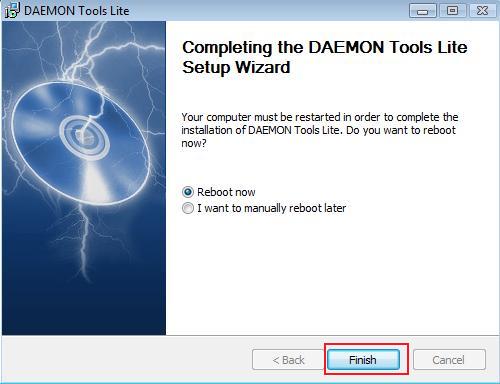
It won't work with window 7.. It keeps telling me to restart and when I do it just keeps repeating step 1 over and over again, never completing the download. Is there a way to install it? Or can you tell me a good alternative?
I have a question, I was wondering about the steps that you've post here.
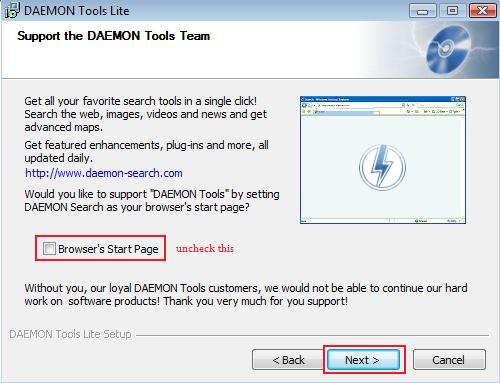
Something is different with mine like when you were suppose to uncheck the things like in step 4, the discription saids that uncheck the windows gadget,browser toolbar, DAEMON tools default search provider.
hey admin, how many times I should reboot my PC to install this daemon tool, I've already restarted my PC 4 times!
It said: please reboot your computer before install this program.
Hello, i have a question to picture 4 of the install explanation. you say i should disable the three marked options if i don´t want to install spyware but these three options were not shown when i tried to install it (perhaps its a newer version). does that mean that they are already disabled oder do i have no other choice than to install them?
No. File associations basically tell windows that when you double click on .iso file to open it in specific program. I'll have to update this guide later to reflect changes to their installer i guess.
I am trying to download the links to make it into the game, but the rar file type is not shown of the DAEMON Tools Lite program. how can i make this work??
ok, i figured out how to do this, but now where do i put the patch info and additional in with the games so that they work? everything i have tried has failed. it doesnt help that my japanese is still lacking so i cant read all the kanji to figure it all out.
Four days ago I downloaded Daemon Tools Lite. Upon installation it also installed Face Smooch which is a malware program, specifically a browser hijacker. See http://botcrawl.com/how-to-remove-facesmooch-malware/ for details. The latest version of Face Smooch is very hard to remove. I have been going back and forth with the support staff at my anti-virus software provider. After running multiple tools over the last few days I will probably remove the last piece of malware tonight. You just can't remove Face Smooch. Face Smooch downloads several other malware programs after it is installed. These different malware programs each have to be deleted by separate tools. If you don't get them all, they will supposedly regenerate.
Anyway after spending multiple hour dealing with all of the malware installed on my computer by Daemon Tools Lite I still don't have a working version of Daemon Tools Lite. Is there another optical drive emulator from another company that you would recommend using in lieu of Daemon Tools Lite?
I would also like to know an alternative for Daemon Tools Lite. I had an older version on my laptop that worked fine for visual novels but my laptop died earlier in the week. I'm now reinstalling all my favorite VNs on a new computer and running into a speed bump since I don't want to install this new version at all.
not too sure about daemon tools but if you have an app called winesomething? sorry cant remember the name you should be able to run it but id look up a proper walkthrough as i cant tell you as ive never used a mac in my life :)
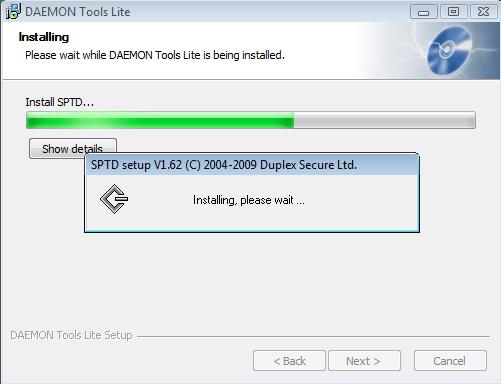
Downloaded Daemon Tools Lite, and during the installation it got about 1/3 of the way done and just won't continue. It never finishes. All it says is "Install core files". What do I do?
Hey so i'm totally new to this and trying to figure this out. Can anyone confirm that Daemon is the up to date thing to use? I see people were having problems with it and this hasnt been brought up in a while. I'm sure there is something else out there to use? I also tried OSFmount but games wouldnt work for different reasons.
Any help would be appreciated.
figured it out, kinda. dumb mistakes, here's what i did for anyone else who is new.
1, use winrar to extract, i was using some random one that wasnt working right.
2, if you're doing the free downloads you need to download all of them for when you extract them
3, the games i've played so far i havent had to do anything with an image mounting software, they seem to just run on it's own app.
Not sure if u have figured it out, but you open the contents of the rar file and move them outside of the file. That's pretty much what an extraction is.
But for it to work properly you need software like winRar or 7Zip, particularly if you are downloading the games in parts. As all the information is all broken apart and needs to be glued back by using such software.
Once you get your extracted file it should show as a folder holding all the contents required to start the game, check for the .exe file open that and the game should start. If it is in Japanese you will either need to install the patch (by dropping a language replacing file or mounting a disk to rewrite the game content), or set English in the game setting.
Hope that helps!
Hello, I really don't know what to do with these files, I downloaded all the .rar files provided, and I have Osfmount installed, now i'm really confused about what to do.
Daemon Tools is used whenever you get a " .iso " file. When you download a game, it leads to different situations.
First, the only thing you might need to do is extract the " .rar " files and it will extract the whole game for you, giving you the game files and whatnot.
Second, when you extract the " .rar " files it might give you a " .iso " file. That is when you need to use daemon tools. It will mount the game to another computer drive, as if you had inserted a game disc into your computer and need to install it first.
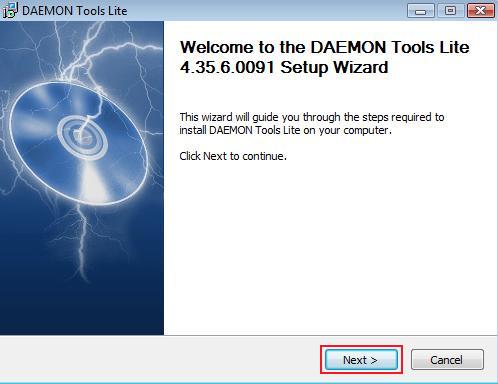
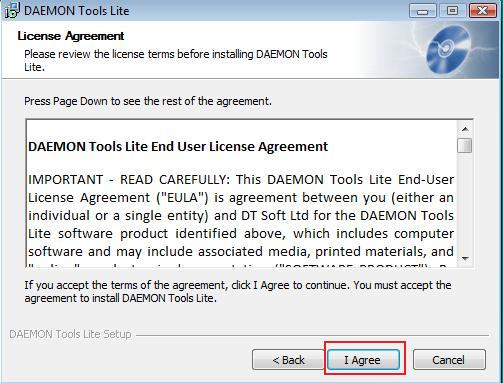
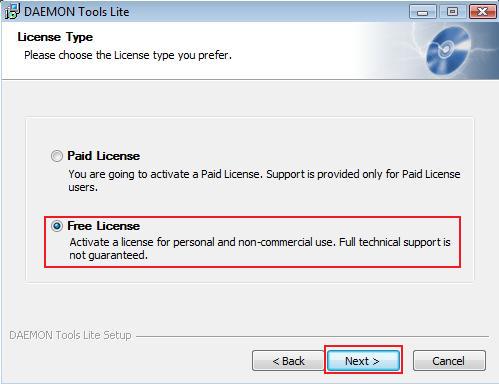
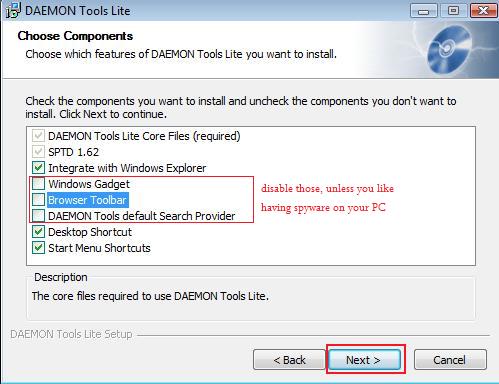
 alt=
alt=
50 comments
Something is different with mine like when you were suppose to uncheck the things like in step 4, the discription saids that uncheck the windows gadget,browser toolbar, DAEMON tools default search provider.
It didn't appear in my PC
Why didn't I think of that? lol XD
It said: please reboot your computer before install this program.
does it requires the mount thingy?
Can't you guys just upload your daemon tools folder from your program file?
Anyway after spending multiple hour dealing with all of the malware installed on my computer by Daemon Tools Lite I still don't have a working version of Daemon Tools Lite. Is there another optical drive emulator from another company that you would recommend using in lieu of Daemon Tools Lite?
Thanks for your help.
i am using OSFmount now, its free and so far so good
daemon tools is no longer free, and they seems to give malware from some reports. i suggest you give new link instead
and for those who are interest : (http://www.osforensics.com/tools/mount-disk-images.html) there are other mounting software other than this of course
i simply wish to help, nothing else.excuse me
Any help would be appreciated.
1, use winrar to extract, i was using some random one that wasnt working right.
2, if you're doing the free downloads you need to download all of them for when you extract them
3, the games i've played so far i havent had to do anything with an image mounting software, they seem to just run on it's own app.
But for it to work properly you need software like winRar or 7Zip, particularly if you are downloading the games in parts. As all the information is all broken apart and needs to be glued back by using such software.
Once you get your extracted file it should show as a folder holding all the contents required to start the game, check for the .exe file open that and the game should start. If it is in Japanese you will either need to install the patch (by dropping a language replacing file or mounting a disk to rewrite the game content), or set English in the game setting.
Hope that helps!
Daemon Tools is used whenever you get a " .iso " file. When you download a game, it leads to different situations.
First, the only thing you might need to do is extract the " .rar " files and it will extract the whole game for you, giving you the game files and whatnot.
Second, when you extract the " .rar " files it might give you a " .iso " file. That is when you need to use daemon tools. It will mount the game to another computer drive, as if you had inserted a game disc into your computer and need to install it first.