English visual novel downloads

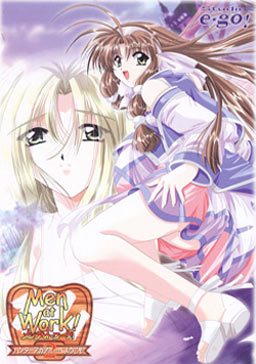
Men at Work! 2

Men at Work! 2

A Hunter Academy was established to teach Monster Hunters.
Cliff came to the academy to become a Hunter,
but the place turns out to be an old building unlike its name suggests,
and the great Hunter couple who was supposed to teach him leaves the Academy to go solve an incident in another town.
The Hunter candidates are all girls except for Cliff.
And after many turns of events, Cliff is placed in charge of the Academy and gets to stay with all the girls…

99 comments

Hikari no YamiReply
Why'd my ultra long list full of instructions made from MY sweat and blood get deleted ..
adminReply
Wordpress (cms engine this site runs on) has problems while displaying pages with many comments - it sometimes shuffle them or put on other pages. I see your comment right about previous, long one.
ShunreiReply
ah not yet, okay then
ShunreiReply
wonderful! thanks Admin!
ShunreiReply
link from media fire for part 03 seems to be broken Admin, Fileserve works perfectly i think
PikachuRoCksReply
Does this have the voice patch in it? I can't get voice no matter how I installed or extracted it.
AnonymousReply
Hello. I have a problem extracting part 1 from mediafire. I am on japanese locale for sure and I have played almost all the games from erogedownload so I dont really know what the problem is. It seems I can't extract the " ??????-?!2 ???-????-?????.msi " file. It looks like it can't read it even when I am on japanese locale or something. These are the errors:
! D:\Games\Men at Work! 2\MenAtWork2.part1.rar: Cannot create ??????-?!2 ???-????-?????.msi
The filename, directory name, or volume label syntax is incorrect.
! D:\Games\Men at Work! 2\MenAtWork2.part1.rar: Attempting to correct the invalid file name
! D:\Games\Men at Work! 2\MenAtWork2.part1.rar: Renaming ??????-?!2 ???-????-?????.msi to ______-_!2 ___-____-_____.msi

Also, the archive is correctly downloaded for sure.
I'd really appreciate some help. I'm using Windows 7 if it helps.
adminReply
you didn't change locale to japanese. winrar doesn't recognize japanese characters and can't extract them.
Shigure2411Reply
Hi Admin, i notice after decompressing the file for Men at Work 2, i had the same problems as Anonymous. I am using Windows 7 Home Premium Edition and i read you cannot change the locale for the OS unless its Windows 7 Ultimate Edition. You can install the language packs for Windows 7 that can allow Japanese fonts to be recognized by the system. Is there a way to bypass this using Windows 7 Home Premium? Greatly appreciate any help or solution for this great game. Pretty sad that i can't play this because of the OS problem.
AnonymousReply
I actually am on japanese locale, I have Windows 7 Ultimate. I dont know why i can't extract them when i get them from here. I played almost all games from erogedownload without any problems until now. Well i managed to make it work, but i downloaded it from other website unfortunately. Sorry admin
jReply
i have a question about the game it's shelf could some one tell me how to heal my team mates
AnonymousReply
Name of the .msi file is:

メンアットワーク!2 ハンターアカデミーへようこそ.msi

Just rename the ??????-?!2 ???-????-?????.msi file to that.
HakuoroReply
thanks for this, was about to pull my hair out before i found this comment!
anonymousReply
hey so i tried applying the english patch and followed steps above, but it keeps saying i need to run as an administrator. i am an administrator and i even right clicked and put "run as administrator". but nothing happens the message shows up again.
Sakaguchi IkuReply
Let's make compile this game into cabinet files to piss everyone off...god forbid we add a simple fucking ISO NOO THAT'D BE TOO EASY
cookiesReply
he admin,
file p art 3 and 4 dont work. you can open them but when you try to download it says that the file has been moved. can you look into it?
AnonymousReply
I've got the game patched properly (I think) and I can start it up no problem, but when the window for the game comes up, all I get is a black screen. How do I make the opening movie or whatever is supposed to happen on startup for this work?
VipReply
If you read the readme file that comes with the game and you scroll down to known issues C. It will tell you what to do.
AnonymousReply
I've tried that. If you mean the part about ffdshow I've not only reinstalled that multiple times, but I have CCCP which comes with it anyway. I never have found that 'radio dial' they mention.
SojyReply
Hey , u don't need window xp to run this game even when u in window 7 also can play this game no problem..u just need 2 download 7zip .msi and 7zip .exe (google it)...
IAmVQBReply
2. I'm wondering can this game run on windows 7? well u see my laptop use wins 7 but my PC use Xp. I prefer to play these kind of games on my laptop ( for reasons we all understand. Anyway Thank u Admin for all the games u've shared
littleenricoReply
works without problems ,nya not realy ...the part 3 wont start downloading ...read not there ..but 3 times of trying downloading and it was there xD
IAmVQBReply
Thanks!
IAmVQBReply
It seem that download ani only allow dl 1 file at a time with free account. although it's fast ( 250Kps or so). But when i dl games like School days or other large games it still take a long long long time. Ahh If only i could afford an account...
gawayReply
the girls' faces were badly drawn. cant fab to it. other than that it was a nice game.
hurghReply
So my old hard drive failed when this game was on it. I was two routes in and working on the Kitty route (if that's her name). Any chance I could get my hands on anyone's saves? I'd rather avoid going through two routes again, spent a lot of time on that...
Nyudo-OkamiReply
This game has an annoying issue where it doesn't save like a regular game.
BanKai...Reply
I play this game but when i try to save that game,the game say "Faild to save"...
roanReply
just downloaded the game, so i got a question regarding heroine's routes. in choosing routes, is this the same as duel savior where i have to clear characters accordingly just like i have to start from berio, then kaede, rico, nanashi, then finally lily if i want that specific heroine?
K134Reply
One of the parts seems to be corrupted, i tried to unpack the part and it failed
MokutonUserReply
Hey.. can anyone help me with this problem...

maw2 has stopped working...
A problem caused the program to stop working correctly...
Windows will close program and notify you if a solution is available

USING WINDOWS 7....
YoReply
Is this patch the Mirrormoon patch?
De3athSmileyReply
Why when i want to extract this file... the msi is error
HiReply
to fix the msi rename it to メンアットワーク!2 ハンターアカデミーへようこそ and i'm having my own problem where it says the system cannot find the file specified
RaijinReply
thanks admin for the download.

I had t download it 3 time before it downloaded correctly. Kept telling me it had broken files, but it is all installed now and haven't had any more problems.

thanks again.
fran00Reply
need save editor pls
Patrik FábiánReply
I have a little problem. Every time I run the patch i get a message that i need to un the patch as administrator even if i do so. How can i fix this?
Joshua-KunReply
Admin, I encountered a problem when I extract it, it just shows that part 1 has some 2 errors when getting extracted, I close it and continue the extraction, then when I open the setup.exe it gives a message box that I cant read cause it's in japanese, I already tried the first "windows installer" type, then open the setup.exe again but nothing happened, It also showed that the setup.exe is not installed properly, How can I solve this? Please help me admin, Much appreciated and Thank you in advance.
MoeteruReply
I just have a little problem with this game, I just change my computer (OS : Windows 10) and when I run the game, the game run fine but I haven't see any random monster...
Someone know how I can fix this problem ?
Thanks !
firbyReply
Cantseem+to+figure+this+install+out.+Ive+got+4+files,+one+is+____-_!2__-___-____.msi,+data1.cab,+data11.cab+and+setup.exe.
The+setup.exe+comes+up+with+an+installer+window+then+a+message+box+mostly+in+japanese?+pops+up+and+only+a+button+to+say+ok+is+there.+It+doesnt+seem+to+have+done+anything.
The+.msi+file+brings+up+a+window+then+a+error+notice+pops+up+references+setup.exe+but+everything+else+is+in+japanese.
I+also+have+the+english+patch+but+that+isnt+of+any+use+yet.
firbyReply
Geez thats what happened after a failed captcha. I think i hit enter part way through lol. Sorry but i cbf re typing that all on my phone. Where there are + that should be a space.
dummyReply
Is this dummy cut? I suspect it is, as there are only Data1 and Data11 files(where are Data2 up to Data10)?
mitchyReply
I also have a problem. When I entered the fighting scene in the prologue the outlines of the characters were black rectangles. I was wondering how to fix this?
thank you.
KuroCuloReply
Anybody ever wondered what Men at work 1 was like? I can't find the damn game anywhere...
marantanaReply
Even after renaming the .msi file and starting setup.exe with jp locale as administrator (using Locale Emulator 2.4, which never failed me before) installshield exits with error 1628: [in japanese] couldn't complete script based installation.

Any ideas? tia
CliffReply
Goshh, fiiinally got it to work. This game seemed such a pain to run, and was actually on the verge of dropping it, so far I'm glad I didn't.
So my problem was one already mentioned, being on jap locale but unable to unrar properly, in the end just found a way to manually type Japanese name for that file, as posted here. If you do that, don't forget the space after the number 2, it's got to be precise or it doesn't work. Now to enjoy 😎
Golden EagleReply
Hey, I have an issue. In the "Crying voice in the cave" mission I cannot find the girl... Help?
Meat SpearReply
Though I had to use my xp to be able to run it, I'm happy I played this rpg eroge. The biggest flaw though here is on the saving system you see in this game if you save and quit during a mission you lose all your progress -_-.
So anyway I decided to leave a couple of tips on this old game here:
* Buying the bath is virtually impossible and even if you manage to get the 9000zel you're probably already too late to get the cgs. What's worse you lose all your zel on your next run. Best to use them on pepper,etc.
* Raise att, def and will - my guess is that it replenishes your force faster, maybe?
* DON'T confuse the load and save tabs, once I accidentally loaded when I wanted to save right after barely beating Kitty's route - you can imagine the frustration.
* Finally, the characters from best to worst in battle:
Cliff: his Whirlwind is the best, it kills crowds at a minimum force cost.
Lucy: normal attack does good damage. Use Double shot and Trigger happy, also Holy warrior for final battle
Aoi:Evil Smiter kills undead instantly though it can miss. Blue fire attacks are nice as well.
The rest:
Mena: Taming monsters with Mena is a pain and not really worth it, you lose them anyway on a second run. Stick with her frying pan and healing. Maybe use failure.
Sheryl: Good normal attack plus ice spells.
Other than that too weak for most fights.
Kitty: too weak for most fights.

Nice game though I couldn't get last 2 routes, game kept defaulting to Mena. And I have to insist, even with the warding bell which decreases random encounters having to beat the game 5 times basically the same way for each route gets so repetitive. Would've been better suited with a ladder structure maybe.
WiliestSoupReply
For everyone having issues on new Windows OS's here is what worked for me.

To bypass all of the issues folks have been having with setup.exe not working, we are going to do a manual install. To do this, follow these steps.

1. Move MenAtWork2.rar's and Men_at_Work_2_English_v1.0.exe to desired install folder.
Extract downloaded rars (If using WINRAR to extract, when the Diagnostic Message appears, click "Close". DO NOT CLICK "BREAK OPERATION"! We will fix this error in the next step.)

2. Move Men_at_Work_2_English_v1.0.exe into Men at Work 2 folder and open it.
Rename the .msi file to メンアットワーク!2 ハンターアカデミーへようこそ.msi (copy the text from here and be sure to not add any spaces at either end by accident)

3. Extract Data1.cab and Data11.cab

4. Make 3 subfolders. Name them SAVE, Music, and Movie respectively

5. Move ALL .avi files to Movie

6. Move ALL .wav files to Music

7. Move ALL .dat files to SAVE except game00.dat, game01.dat, game02.dat files. They’re okay where they are

-Manual installation is now complete- To install the english patch, continue to step 8.

8. Right click on the Men_at_Work_2_English_v1.0.exe and click Troubleshoot compatibility

9. Click the bottom option (Troubleshoot program)... Check 1st and 3rd boxes (The program worked in earlier versions etc. and The program requires additional permissions)

10. Select Windows XP (Service Pack 3)... Click "Next" then select "Test the Program"... A user account control message should appear... Click "Yes"...

11. When the patcher appears, click "Cancel" to close it. When the window pops up to confirm you wish to exit the installer, click "Yes" Then back to the Compatibility Troubleshooter, click "Next" to change the .exe file.

12. Click the top option (Yes, save these settings for this program) and then click "Close"

13. Run Men_at_Work_2_English_v1.0.exe and another user account control message should appear... Click "Yes"...

14. The patcher should appear...
Click "Next"...
Put a check agreeing to the EULA...
Put a check on Subtitled OP if you want... and Click "Next"...
Click "Browse" then search for the folder you’ve been working in all this time... You’ll know what to do after that...

Once it is finished, click "Finish"... A maw2-enlish.exe should appear in the folder (replacing it’s Japanese predecessor)

This should work for windows 10 and 11 for anyone who still wishes to play this today in 2025.

Hope this helps!!!

Special Thanks to Hikari no Yami and their guide from 2011 in the comments here. I took it and just made it more clear and concise and posted it here so more folks will see it.

P.S.
This is not necessary but for those wishing to save some space it is safe to delete the following files:

Men_at_Work_2_English_v1.0.exe
setup.exe
Data1.cab
Data11.cab
MenAtWork2.rar's

P.P.S.
For those who wish for a Walkthrough, just google it and you should find some.
WiliestSoupReply
For step 2, I meant to say, open the folder. Do not run the english patcher until later... Sorry for the confusion this might cause...

Leave a comment